FlutterFlow
Contact
FlutterFlow
Visual Flutter app builder with AI features, code export, and deployment workflows.
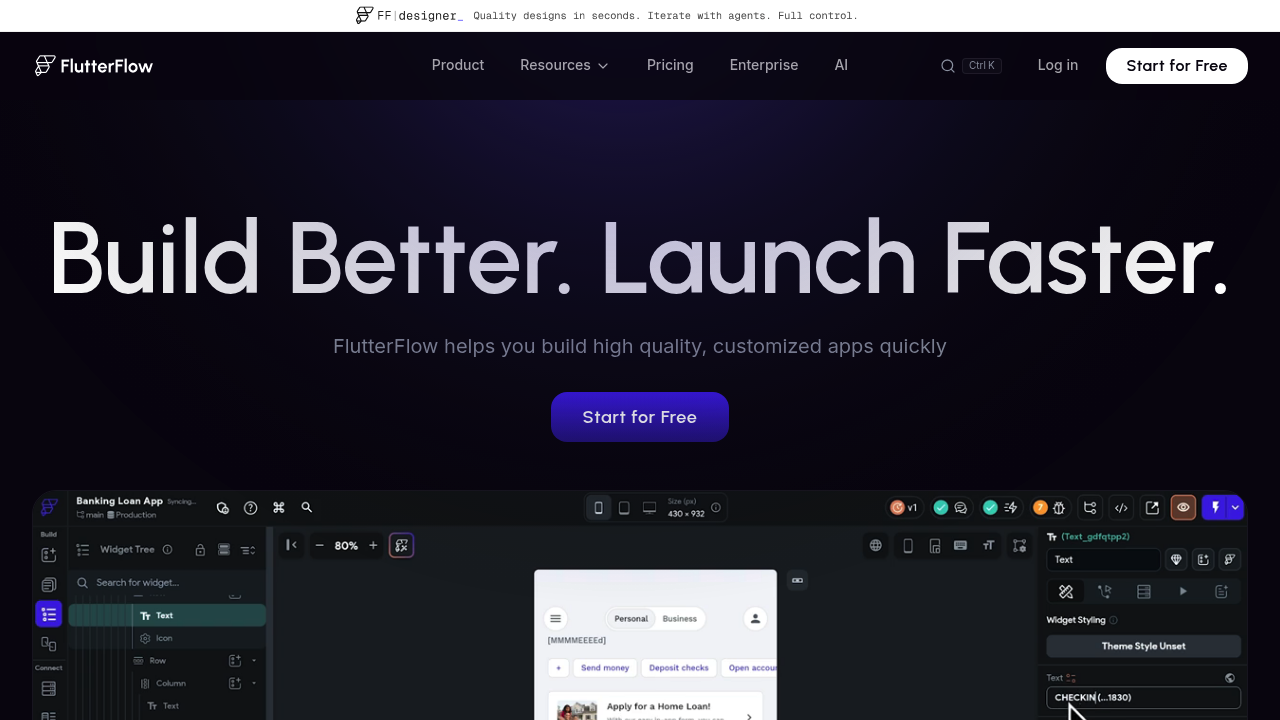
FlutterFlow: A Windsurf Alternative for cross-platform app building for web, iOS, and Android with visual UI design, action flows, backend wiring, and exportable Flutter code
FlutterFlow is a AI app builder built for founders, product teams, and agencies that want to ship Flutter apps with a visual canvas, backend integrations, and exportable code without living inside a terminal agent all day. As a Windsurf alternative, it is best suited for teams that want cross-platform app building for web, iOS, and Android with visual UI design, action flows, backend wiring, and exportable Flutter code instead of an IDE-first coding workflow.
FlutterFlow vs. Windsurf: Quick Comparison
| FlutterFlow | Windsurf | |
|---|---|---|
| Type | AI app builder | AI IDE |
| IDEs | Browser-based visual builder with code export; no native IDE plugin workflow is the core product story | Standalone/editor-centric coding workflow |
| Pricing | Free plan available at $0/month on the public pricing page Public pricing shows paid entry from $39/month, with higher public tiers around $80/month and $150/month depending on plan | Not publicly documented |
| Models | Not publicly documented | Not publicly documented |
| Privacy / hosting | Managed cloud builder with hosted collaboration and exportable code; self-hosting is not the core workflow | Not publicly documented |
| Open source | No | No if treated as product platform |
Key Strengths
- Visual editing is the main workflow, not an afterthought: FlutterFlow is built around a browser canvas with real UI components, action flows, and test mode. That makes it easier to reason about screens, navigation, and state changes when your project is mostly an application product instead of a coding assistant workflow.
- Cross-platform delivery changes the value proposition: Windsurf is fundamentally about helping developers write code faster. FlutterFlow is about shipping web, iOS, and Android experiences from one builder, which matters more when the product roadmap already includes mobile.
- It offers a clearer export path than classic no-code tools: FlutterFlow is not open source, but code export is part of the product story and the platform openly supports docs, templates, and developer workflows. That gives teams a stronger fallback than black-box builders that trap everything inside a proprietary runtime.
Known Limitations
- Limitation 1: It is not an IDE, so it does not replace Windsurf for repository refactors, terminal work, debugging sessions, or CLI-first agent loops.
- Limitation 2: The workflow assumes you are comfortable thinking in Flutter and generated app structure, which can still be a learning curve for purely web-first founders.
- Limitation 3: Managed-builder convenience is useful, but the platform remains a hosted product with its own abstractions, pricing tiers, and export boundaries.
Best For
FlutterFlow fits teams that judge success by shipping an application surface quickly, keeping product/design discussions close to the build flow, and reducing the amount of raw coding required before a first release. It is usually a better fit for founders, agencies, and product teams that want a managed builder with visible UI output than for engineers who want every step to begin inside an IDE.
The strongest fit appears when the roadmap includes front-end iteration, app delivery, and stakeholder review more than deep repository maintenance. If the team already knows it wants a code-first workflow, this product can still be useful, but its main advantage shrinks quickly.
Pricing
- Free: Free plan available at $0/month on the public pricing page
- Paid: Public pricing shows paid entry from $39/month, with higher public tiers around $80/month and $150/month depending on plan
- Notes: The free plan is real, which lowers the barrier for testing a visual app workflow before committing to a full migration away from an IDE-first tool.
Prices are subject to change. Check the official pricing page for current details.
Tech Details
- Type: AI app builder
- IDEs: Browser-based visual builder with code export; no native IDE plugin workflow is the core product story
- Key features: 200+ pre-designed UI elements, visual Action Flow Editor, Test Mode, Firebase integration, Supabase integration, REST API support, payments, maps, branching, comments, task assignment
- Privacy / hosting: Managed cloud builder with hosted collaboration and exportable code; self-hosting is not the core workflow
- Models / context window: Not publicly documented
When to Choose This Over Windsurf
- Choose FlutterFlow when the product goal is to ship a polished app visually instead of accelerating hand-written code inside an IDE.
- Choose it when the roadmap includes iOS and Android, not just a web MVP.
- Choose it when design, product, and development need one shared canvas instead of a terminal-centered coding loop.
When Windsurf May Be a Better Fit
- Windsurf is a better fit when the job is editing an existing repository, running agentic code tasks, or staying close to normal software-engineering workflows.
- Windsurf is stronger when custom backend logic, repo-scale refactors, and terminal control matter more than a visual builder.
- Windsurf is also the safer default if your team already knows it wants a code-first path rather than a Flutter-specific app-building stack.
Conclusion
External reviews consistently frame FlutterFlow as one of the most mature visual AI-assisted app builders for teams that want mobile-capable output and code export. The recurring caution is that it solves app production, not general software engineering.
FlutterFlow makes the most sense when the real job is shipping an app experience, not accelerating a terminal-centered engineering loop. If you need repo control, debugging depth, and agentic code edits more than a managed builder, Windsurf remains the more honest choice.
Sources
FAQ
Is FlutterFlow free?
Yes. FlutterFlow's public pricing page includes a free plan at $0 per month.
Does FlutterFlow replace Windsurf?
Only for visual app-building use cases. It does not replace Windsurf's IDE-first coding workflow for repo work or terminal tasks.
Is FlutterFlow good for mobile apps?
Yes. FlutterFlow is explicitly positioned for cross-platform web, iOS, and Android output.
Can you export code from FlutterFlow?
Yes. Exportable code is part of FlutterFlow's public product story, which makes it more flexible than many black-box no-code builders.
Workflow Notes
FlutterFlow also changes the working relationship between developers and non-developers. Product managers, founders, and designers can usually contribute earlier because the interface exposes visual state, deployment ideas, and app behavior more directly than an IDE does.
That does not automatically make the platform better. It means the tradeoff should be judged against your team structure: if the project needs shared visibility and faster app iteration, the builder workflow becomes a benefit; if it needs unrestricted engineering control, the same abstraction becomes friction.
Migration Questions Teams Should Ask
Before switching from Windsurf to FlutterFlow, the team should decide whether it is replacing a coding workflow or adding a faster app-shipping layer on top of one. That question matters because many disappointments with AI builders come from expecting them to behave like IDE agents once the project grows beyond the initial prototype.
The safest path is usually to define a small product slice, ship it, and then judge how much of the resulting app still belongs inside the builder. If the platform keeps helping after the first launch, it is a good sign; if the team immediately wants lower-level control, Windsurf or another code-first environment should stay central.
Operational Tradeoffs
FlutterFlow can reduce setup friction, but it also concentrates more decisions inside one platform. Billing, deployment, collaboration, and data architecture may become easier to start with, yet they can also become more opinionated than a developer-centered IDE workflow.
That is why this comparison should be read as a workflow choice rather than a raw feature race. Windsurf helps teams write and maintain code faster, while FlutterFlow helps teams turn product ideas into app surfaces faster. Those are adjacent goals, not identical ones.
Community Signal
External reviews consistently frame FlutterFlow as one of the most mature visual AI-assisted app builders for teams that want mobile-capable output and code export. The recurring caution is that it solves app production, not general software engineering.
Workflow Notes
FlutterFlow also changes the working relationship between developers and non-developers. Product managers, founders, and designers can usually contribute earlier because the interface exposes visual state, deployment ideas, and app behavior more directly than an IDE does.
That does not automatically make the platform better. It means the tradeoff should be judged against your team structure: if the project needs shared visibility and faster app iteration, the builder workflow becomes a benefit; if it needs unrestricted engineering control, the same abstraction becomes friction.
Migration Questions Teams Should Ask
Before switching from Windsurf to FlutterFlow, the team should decide whether it is replacing a coding workflow or adding a faster app-shipping layer on top of one. That question matters because many disappointments with AI builders come from expecting them to behave like IDE agents once the project grows beyond the initial prototype.
The safest path is usually to define a small product slice, ship it, and then judge how much of the resulting app still belongs inside the builder. If the platform keeps helping after the first launch, it is a good sign; if the team immediately wants lower-level control, Windsurf or another code-first environment should stay central.
Operational Tradeoffs
FlutterFlow can reduce setup friction, but it also concentrates more decisions inside one platform. Billing, deployment, collaboration, and data architecture may become easier to start with, yet they can also become more opinionated than a developer-centered IDE workflow.
That is why this comparison should be read as a workflow choice rather than a raw feature race. Windsurf helps teams write and maintain code faster, while FlutterFlow helps teams turn product ideas into app surfaces faster. Those are adjacent goals, not identical ones.
Community Signal
External reviews consistently frame FlutterFlow as one of the most mature visual AI-assisted app builders for teams that want mobile-capable output and code export. The recurring caution is that it solves app production, not general software engineering.