Onlook
Contact
Onlook
Onlook: A Windsurf Alternative for Visual React App Design and Building
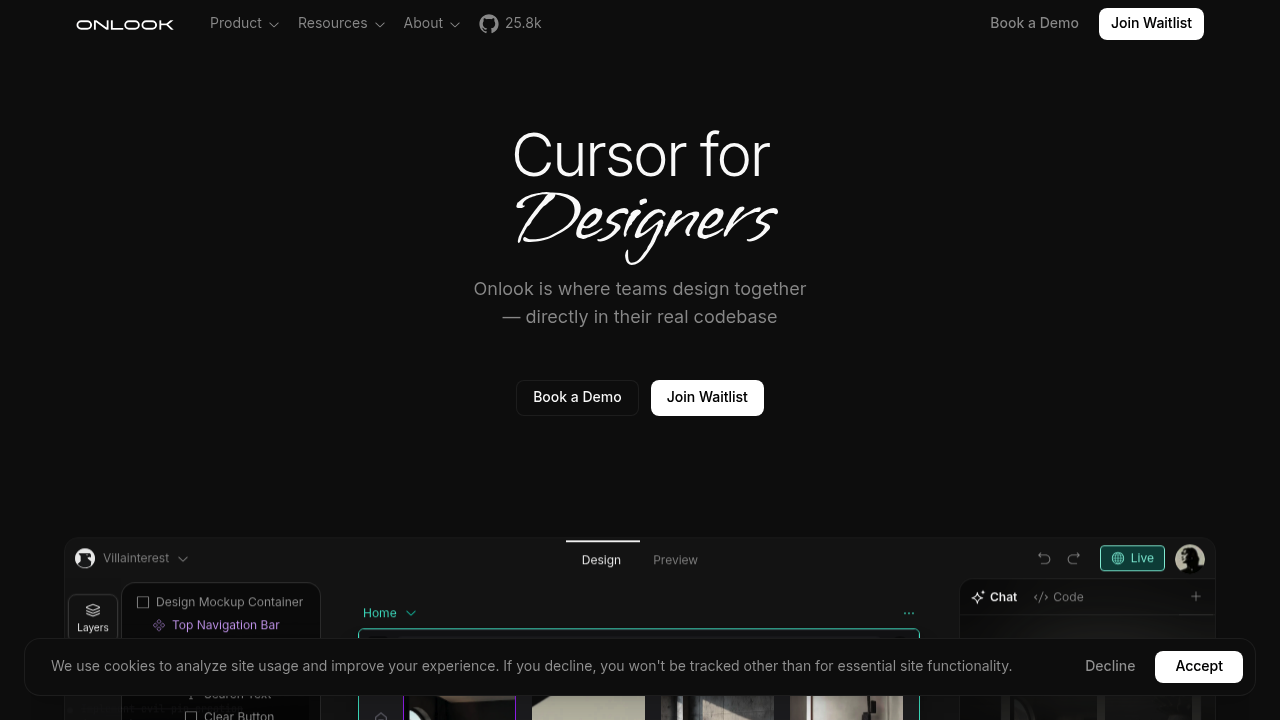
Onlook is an open-source, AI-first visual editor for React and Next.js applications, developed by the onlook-dev team under a public GitHub repository, designed to let designers and developers build, style, and edit React components using a Figma-like interface directly on live code. As a Windsurf alternative, Onlook focuses on the design-to-code workflow rather than traditional code-first development, bridging the gap between visual design tools and production-grade React codebases.
Onlook vs. Windsurf: Quick Comparison
| Onlook | Windsurf | |
|---|---|---|
| Type | Visual AI IDE / Design-to-Code Editor | AI IDE |
| IDEs | Standalone web-based visual editor (browser + local) | Standalone / editor-centric workflow |
| Pricing | Self-hosted free (open source); hosted cloud via contact/demo | Free tier + paid from $15/mo |
| Models | AI-powered code generation (model details not publicly disclosed) | Cascade + multiple model options |
| Privacy / hosting | Self-hosted (open source) or cloud (contact team) | Cloud |
| Open source | Yes (GitHub: onlook-dev/onlook) | No |
Key Strengths
- Figma-like visual editing on live code: Onlook provides a drag-and-drop, direct-manipulation editor interface that operates directly on your Next.js + TailwindCSS codebase. Unlike mockup-based design tools, every visual change in Onlook writes real React/TypeScript code as the source of truth, eliminating the design-to-developer handoff entirely.
- AI-powered prompt-to-build for React apps: Users can describe UI changes or entire layouts in plain language, and Onlook's AI generates corresponding React components with TailwindCSS styling. The tool supports starting from text prompts, images, Figma imports, or GitHub repositories, making it accessible to designers without deep React knowledge.
- Real-time code editor side-by-side with visual view: Onlook runs the visual editor, AI chat, and real-time code in a three-pane interface. Changes made visually appear instantly in code; edits in code reflect immediately in the canvas. This bidirectional sync enables designer-developer collaboration without context switching between tools like Figma and an IDE.
- Open-source and self-hostable: The full Onlook codebase is publicly available on GitHub, allowing teams to audit, modify, and self-host the tool at no cost. This differentiates it from commercial Windsurf alternatives that lock functionality behind subscriptions.
Known Limitations
- React/Next.js + TailwindCSS only (for now): Onlook is optimized specifically for Next.js and TailwindCSS projects. Support for non-NextJS and non-Tailwind projects is listed as a future roadmap item, limiting its applicability for teams using other frameworks or CSS methodologies.
- Cloud pricing not publicly disclosed: While the self-hosted version is free, the hosted cloud tier requires contacting the Onlook team or booking a demo. There are no public pricing tiers, making cost estimation difficult for teams evaluating it against commercial alternatives.
- Early-stage feature completeness: Several features including non-Next.js support, advanced MCP toolcall integration, and certain collaboration features are still listed as in-progress on the GitHub roadmap. Teams needing a fully mature, enterprise-ready tool may find Onlook's current state too early for critical production workflows.
Best For
Onlook is best suited for product teams where designers and frontend developers collaborate closely on React/Next.js + TailwindCSS applications, and who want to eliminate the traditional Figma → handoff → code cycle. It is particularly valuable for startups, indie developers, and design-led teams building web applications or SaaS products who want a single tool for prototyping, designing, and shipping code. Open-source contributors and teams who want transparency and self-hosting control will also find Onlook a compelling Windsurf alternative for UI-heavy development.
Pricing
- Free (self-hosted): Onlook can be self-hosted for free via GitHub. No usage fees, no seat limits for the self-hosted deployment.
- Cloud / Hosted: Available via contact with the Onlook team or by booking a demo. Pricing is not publicly listed and is set up collaboratively based on team needs.
For current pricing details, see the official Onlook pricing page.
Tech Details
- Type: Open-source visual AI editor / design-to-code IDE for React
- Platforms: Web-based (browser-accessible); self-hostable via GitHub; targets Next.js + TailwindCSS projects
- Key features: Figma-like drag-and-drop UI, AI chat with prompt-to-build, real-time code editor, Figma import, GitHub repo import/PR creation, component management, branching, image assets, CLI command runner, custom domain deployment, real-time team collaboration
- Privacy / hosting: Self-hosted (open source) or managed cloud via contact
- Models / context: AI-powered code generation; specific underlying model not publicly disclosed
- License: Open source (GitHub: onlook-dev/onlook)
When to Choose This Over Windsurf
- Your team includes designers who need to contribute directly to a React codebase without writing code from scratch, requiring a Figma-style interface.
- You want a design-to-code workflow where the visual editor and codebase are always in sync, eliminating the handoff step between design and development.
- You are building Next.js + TailwindCSS applications and want open-source tooling with no vendor lock-in and self-hosting capability.
- You need to import existing Figma designs or GitHub repositories directly into your editor and iterate on them with AI assistance.
When Windsurf May Be a Better Fit
- You are a developer who primarily writes backend, CLI, or non-React code and needs a general-purpose AI coding assistant rather than a React-specific visual editor.
- You want a fully managed, immediately available AI IDE with transparent pricing and no self-hosting setup required.
Conclusion
Onlook offers a distinctive approach in the AI coding tool space by targeting the designer-developer collaboration gap rather than the traditional code-completion workflow. Its Figma-like interface on top of live Next.js code, combined with open-source availability and AI-powered prompt-to-build capabilities, makes it a specialized but compelling Windsurf alternative for React-centric teams. As the roadmap matures, Onlook's potential to replace both design tools and AI code editors in a single workflow is significant.
Sources
FAQ
Is Onlook free to use?
The self-hosted version of Onlook is free and open source, available on GitHub. The managed cloud version requires contacting the Onlook team for pricing, which is determined based on your team's needs.
Does Onlook work with frameworks other than Next.js?
Currently Onlook is optimized for Next.js + TailwindCSS projects. Support for non-Next.js and non-Tailwind projects is on the public roadmap but has not been released as of May 2026.
Can I import my existing Figma designs into Onlook?
Yes. Onlook supports importing designs from Figma directly into the editor, as well as importing existing GitHub repositories. You can also export code to GitHub or generate shareable links for deployment.
How is Onlook different from v0, Lovable, or Bolt.new?
Onlook's primary differentiator is that it operates directly on your existing codebase using code as the source of truth. It provides a visual editor (not just a chat interface) and is designed for ongoing editing of real production React apps, not just rapid prototyping from scratch.