Fitten Code
Contact
Fitten Code
AI coding assistant extension for VS Code and JetBrains. 80+ language support, cross-file awareness, code completion, chat Q&A. Free tier available.
Fitten Code: A Windsurf Alternative for AI Code Completion in VS Code and JetBrains IDEs
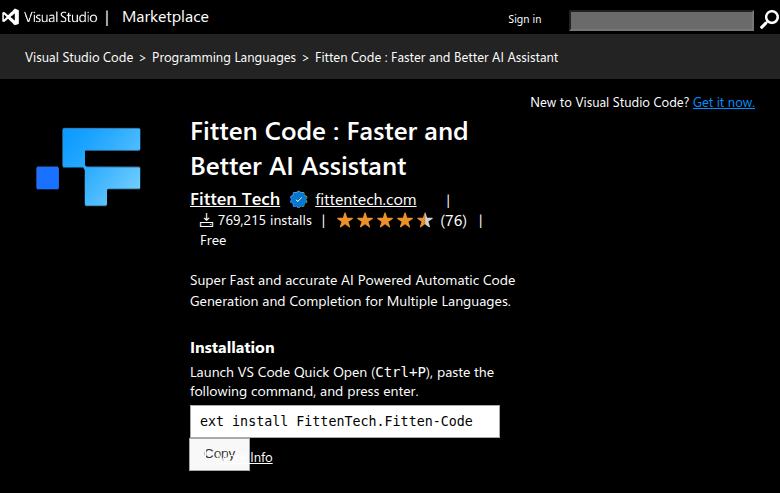
Fitten Code is an AI coding assistant IDE extension developed by Feishi Technology, a company founded by Tsinghua University PhD researchers. It supports VS Code and JetBrains IDEs with features including code auto-completion, comment-to-code generation, code explanation, bug debugging, unit test generation, and cross-file awareness across 80+ programming languages. As a Windsurf alternative, it is best suited for developers who want AI code completion within their existing IDE — without switching to a new editor.
Fitten Code vs. Windsurf: Quick Comparison
| Fitten Code | Windsurf | |
|---|---|---|
| Type | IDE Extension (VS Code + JetBrains) | AI IDE (standalone) |
| IDEs | VS Code, JetBrains IDEs | Standalone / editor-centric workflow |
| Pricing | Free tier available (VS Code Marketplace, JetBrains plugin page); paid tiers not publicly documented in detail | Not publicly documented |
| Models | Not publicly documented | Cascade (proprietary) |
| Privacy / hosting | Cloud (Feishi Technology, China-headquartered); self-hosted option not publicly documented | Not publicly documented |
| Open source | No | No |
Key Strengths
- Free tier available — no immediate cost to try: Fitten Code has a free tier documented on the VS Code Marketplace and the JetBrains plugin page. This allows developers to evaluate the tool with zero upfront cost. For developers on a budget or evaluating multiple AI coding tools, this lowers the barrier to entry significantly compared to paid-only alternatives.
- Works inside VS Code and JetBrains — no editor switch needed: Fitten Code is an extension, not a standalone IDE. Developers who already use VS Code or JetBrains (IntelliJ IDEA, PyCharm, GoLand, WebStorm, etc.) can add AI coding assistance without changing their workflow or learning a new editor. This is a meaningful practical advantage for teams with established toolchain preferences.
- 80+ programming language support: Fitten Code supports over 80 programming languages including Python, JavaScript, TypeScript, Java, C++, Go, Rust, and more. This broad coverage makes it usable across diverse tech stacks without per-language limitations. Cross-file awareness and project-level autocomplete extend the tool beyond single-file completion.
- Academic research foundation: Fitten Code was created by Feishi Technology, founded by Tsinghua University PhD researchers. This academic pedigree suggests a research-grounded approach to model training and code understanding. The tool is positioned in the Chinese AI research ecosystem with broader international VS Code and JetBrains availability.
Known Limitations
- Primarily a Chinese-market tool with limited English documentation: Fitten Code is developed by a China-headquartered company and is more established in the Chinese developer market. English documentation is less comprehensive than comparable Western tools. Users outside China may find support, changelogs, and community resources less accessible.
- Paid tier pricing details are not publicly documented: While a free tier exists, detailed pricing for paid plans is sparse in public documentation. Teams that need to budget for AI tools cannot easily compare Fitten Code's cost against alternatives without contacting the company or signing up to discover tier limits.
- Less agentic than Windsurf — no multi-step task automation: Fitten Code focuses on code completion, chat Q&A, and single-step tasks like test generation and bug explanation. It does not offer the multi-step agentic task execution that Windsurf's Cascade mode provides. Teams wanting autonomous task delegation or complex multi-file workflows will find Fitten Code's capabilities limited compared to agentic tools.
- No self-hosted option publicly documented: Fitten Code's hosting model is cloud-based via Feishi Technology's infrastructure. There is no publicly documented self-hosted or on-premise option. Teams with strict data governance requirements or air-gapped environments cannot use Fitten Code under current documentation.
Best For
Fitten Code is best for individual developers and small teams who want AI code completion within VS Code or JetBrains IDEs without changing their editor. It is particularly suited for developers in multi-language projects who want broad language coverage and a free starting point.
Teams working in environments where switching to a new IDE (like Windsurf) is impractical — due to existing toolchain investments, enterprise IDE standardization, or personal preference — will find Fitten Code's extension model more practical. It is less suited for teams wanting agentic multi-step task automation or zero-trust data policies.
Pricing
- Free: Available — documented on VS Code Marketplace and JetBrains plugin pages (exact credit/usage limits not publicly specified)
- Paid tiers: Not publicly documented in detail
Free tier verified from VS Code Marketplace. Paid pricing details not publicly documented as of verification date. Check the official site for current information.
Tech Details
- Type: IDE Extension
- IDEs: VS Code, JetBrains IDEs (IntelliJ IDEA, PyCharm, GoLand, WebStorm, and others)
- Key features: Code auto-completion, comment-to-code generation, code explanation, bug debugging assistance, unit test generation, cross-file awareness, project-level autocomplete, AI chat Q&A, 80+ programming language support
- Privacy / hosting: Cloud (Feishi Technology, China-headquartered); self-hosted option not publicly documented
- Models / context window: Not publicly documented
- Developer: Feishi Technology (founded by Tsinghua University PhD researchers)
Fitten Code's cross-file awareness and project-level autocomplete differentiate it from basic completion tools that only understand the current file. The AI chat Q&A feature allows developers to ask questions about code — similar to GitHub Copilot Chat — without leaving their IDE.
The tool is available on both the VS Code Marketplace and the JetBrains Marketplace, making it accessible across two of the most widely used IDE ecosystems without requiring additional setup beyond the standard plugin installation process.
When to Choose Fitten Code Over Windsurf
- You want AI code completion within VS Code or JetBrains without switching to a new standalone IDE. Fitten Code works as an extension in your existing environment.
- You want to start with a free tier before committing to a paid AI coding tool. Fitten Code's free tier is documented with no immediate cost requirement.
- You work across many programming languages and need broad coverage. Fitten Code supports 80+ languages including less common ones that some tools deprioritize.
- Your team is standardized on JetBrains IDEs for enterprise tooling and cannot adopt a new standalone editor like Windsurf.
When Windsurf May Be a Better Fit
- You want multi-step agentic task automation with AI that can plan, execute, and iterate across multiple files and commands. Windsurf's Cascade mode provides this; Fitten Code focuses on completion and single-step tasks.
- You need transparent pricing tiers, clear context window documentation, and detailed model specifications. Fitten Code's public documentation is sparse on these details compared to more transparent alternatives.
- You require a self-hosted or air-gapped AI solution with verified data residency outside China. Fitten Code does not publicly document self-hosted options, and its infrastructure is China-headquartered.
- You want a more polished, English-first developer experience with a larger Western community and ecosystem support. Windsurf is more established in English-language developer communities.
Conclusion
Fitten Code is a practical Windsurf alternative for developers who want AI code completion and chat within their existing VS Code or JetBrains IDE without switching editors. Its free tier, 80+ language support, and cross-file awareness make it accessible for individual developers and budget-conscious teams. Teams that need agentic multi-step automation, transparent pricing, self-hosted options, or English-first support will likely find Windsurf or other alternatives better suited to their requirements.
Sources
FAQ
Is Fitten Code free?
Yes. Fitten Code has a free tier documented on the VS Code Marketplace and JetBrains plugin page. Exact usage limits for the free tier are not publicly specified. Paid tiers exist but pricing details are not publicly documented in detail — check the official site for current information.
Does Fitten Code work with VS Code?
Yes. Fitten Code is available as an extension on the VS Code Marketplace (extension ID: FittenTech.Fitten-Code). It also supports JetBrains IDEs including IntelliJ IDEA, PyCharm, GoLand, and WebStorm. Installation follows the standard IDE plugin process.
How does Fitten Code compare to Windsurf?
Windsurf is a standalone AI IDE with agentic Cascade mode for multi-step task automation and in-editor code editing. Fitten Code is an IDE extension for VS Code and JetBrains that focuses on code completion, chat Q&A, and single-step tasks like test generation and bug explanation. Fitten Code is better for staying in your existing IDE; Windsurf is better for agentic multi-step coding workflows.
What programming languages does Fitten Code support?
Fitten Code supports 80+ programming languages including Python, JavaScript, TypeScript, Java, C++, Go, Rust, and many others. Cross-file awareness and project-level autocomplete extend coverage beyond single-file completion for complex multi-language projects.
Is Fitten Code available outside China?
Yes. Fitten Code is available internationally through the VS Code Marketplace and JetBrains Marketplace. However, it is primarily developed for the Chinese market and English documentation is less comprehensive than comparable Western tools. Infrastructure is hosted by Feishi Technology, a China-headquartered company.